
Only players registered with IFBT account can participate in the IFBT sanctioned tournaments. Players must have paid their annual IPCode.
To register in the European Championships you must enter in your profile.
If you have played an official IFBT tournament in recent years, you already have an IP Code.
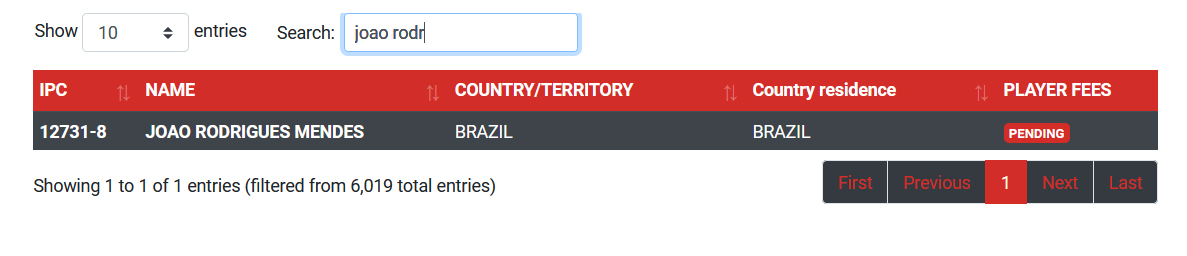
– Go to the main menu, select IP Code >> Search IP Code.

– Enter your name and if it exists the IP Code, Name and Country and Country of residence will appear, and if you are up to date on payment. (paid in green color and pending in red color)
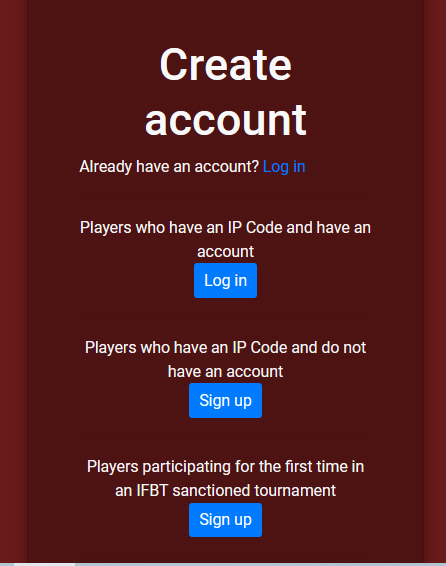
Only players with IFBT account can enter in their profile. If you don’t have account choose 2 or 3 and create one.
Enter through the link in the top menu Login IP Code, and choose which of the three options is yours
1- Players who have an IP Code and have an account
2- Players who have an IP Code and do not have an account
3- Players participating for the first time in an IFBT sanctioned tournament
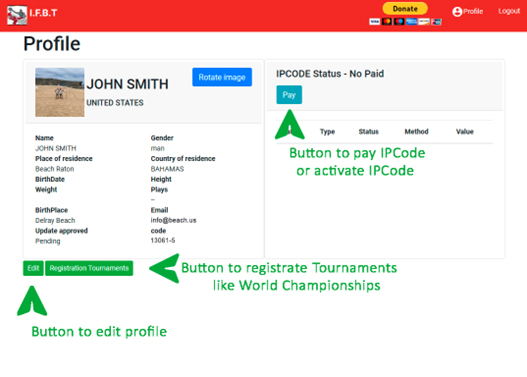
If you have an IFBT account, enter in your profile and click in the green button “Registration Tournament” and select the tournament that you are interested to register.